Automating Net Promoter Score® Data Collection
Manual transactional NPS programmes survive about six months before someone gets bored of doing the data download and upload, and the programme quietly dies. Automation isn't optional. Automating NPS data collection requires: timely survey delivery, efficient reporting, in-depth analysis and closed-loop service recovery. We'll also cover how to choose between general survey tools, in-house builds, dedicated NPS vendors and CRM extensions.

On this page
Implementing a system that will automate the data collection and reporting elements of a Net Promoter Score (NPS®) process is an important step in integrating this key measure into the business.
Without effective automation of the task, it can often become too difficult to maintain and can fall by the wayside.
The 2026 answer to “how do I automate this” almost always starts “Use AI to…”
And yes, AI is excellent for sentiment analysis. That’s useful when you’re triaging thousands of consumer responses a week. For a B2B programme built on a few hundred named accounts, the bottleneck was never reading the comments fast enough. It’s making sure a person looks at your biggest account’s response before the system files it as “actioned” and moves on.
What Is Net Promoter Score?
Net Promoter Score (NPS®) is a customer survey methodology that measures and predicts customer loyalty from a single question. We have an in-depth guide to Net Promoter Score if you need the full background.
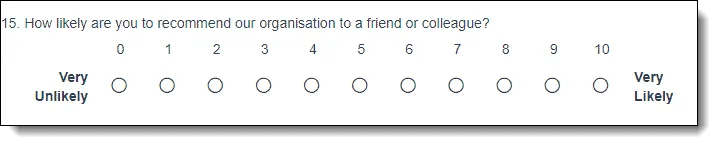
It centres on one critical question:
The NPS Question
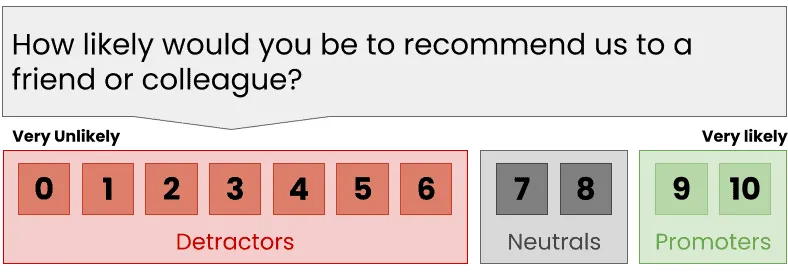
Customers respond on a scale from 0 (Very Unlikely) to 10 (Very Likely), and the distribution of those answers sorts them into three groups:
- Detractors (0-6): unhappy customers who can harm the brand through negative word-of-mouth.
- Neutrals (7-8): satisfied but unenthusiastic customers a competitor could still win over.
- Promoters (9-10): loyal customers who keep buying and refer others.
The Net Promoter Score is the percentage of Detractors subtracted from the percentage of Promoters, giving a score between -100 and +100.
Companies with a higher Net Promoter Score than their competitors tend to show stronger revenue growth, which is why NPS gets used as a proxy measure for customer loyalty.
What Is a Transactional NPS Survey?
Transactional NPS measures the NPS of an individual customer transaction, or a sample of them, and gathers specific feedback about what the customer liked and disliked at that moment. Applying Transactional NPS at key service Moments of Truth (MoT) lets an organisation make process changes that improve both the Transaction and the Relationship score.
Net Promoter was first published in 2004 as a Relationship metric: on a regular cycle, perhaps every year or six months, an organisation surveys its whole customer base to get an overall Relationship NPS score. The problem that surfaced is that while Relationship NPS correlates with revenue, it’s difficult to convert into action. Knowing your score is X tells you much less than knowing how to move it to X+5. Transactional NPS was developed to close that gap.
See this related post for more on Transactional Net Promoter Score.
Why Transactional NPS Always Needs Automation
Firing a survey every time a customer hits a service Moment of Truth can mean sending tens, hundreds or thousands of personalised surveys a day. Each one relates to a different transaction and needs to be reported and actioned individually, not batched at the end of a cycle.
That volume is the reason manual transactional programmes rarely last: someone has to pull the list, send the survey, chase the data and action every low score by hand, every single day, and the task eventually falls to the bottom of that someone’s list.
An annual or six-monthly Relationship NPS survey doesn’t have the same requirement. You can plan the send in advance, and reporting and analysis happen once, at the end, in an orderly way.
What Automating NPS Data Collection Requires
Automation for Transactional NPS falls into four areas.
Timely Survey Delivery
Trigger the personalised survey soon after the customer goes through the Moment of Truth. This requirement includes contact rules, so a frequent customer doesn’t get over-surveyed. That means a cap on how often the same contact can be asked, along with a cooldown period between invites.
Timely Reporting
Report the feedback in real time in a way that reaches client-facing staff and management. Reports must go to the right people on a timely basis rather than sitting in a single inbox.
Enable Analysis
Deliver the feedback in a form that supports easy analysis, including root cause work and hypothesis testing, not just a raw score.
Close the Loop to Enable Service Recovery
One of Transactional NPS’s biggest advantages is triggering timely service recovery. Automation must alert the right staff, based on the response a customer gives, so someone can act accurately and quickly.
Closing the loop is also the step where the return on automation is largest.
CustomerGauge’s B2B NPS and CX Benchmarks Report found that closing the loop within 48 hours lifts customer retention by 12% and raises NPS by an average of six points; Eaton Corporation used CustomerGauge’s workflow automation to cut its own closed-loop process from four months to 48 hours. Source: Closed Loop Feedback (CX) Best Practices + Examples
What automation shouldn’t do, for a B2B programme built on a relatively small number of high-value accounts, is the judgement call on what to do about a bad score from your largest customer. That decision needs a person who understands the account, not a workflow rule that closes the ticket because a follow-up email went out.
Software Options for NPS Automation
There are four broad routes to automating the Transactional NPS process.
General-Purpose Survey Tools
Tools such as SurveyMonkey or QuestionPro are reasonable platforms for automating customer surveys, and many let you customise the reporting for a basic Net Promoter Score.
Where they fall short is the specialised reporting and workflow engine, particularly service recovery triggers, that a serious Transactional NPS programme needs.
In-House Development
Building a survey system in-house is the second route. The major cost is the design, development and testing of infrastructure (an email engine, data interfaces, a reporting platform, service recovery automation and more) built for one company’s use, plus the ongoing cost of maintaining it as requirements change.
AI coding tools make this route look much easier than it used to. A competent developer can now produce a working survey form, an email send and a basic dashboard in days.
That first version is the easy part. The hard parts don’t show up in a demo.
A Survey Platform Is Many Systems, Not One
A production feedback platform is a stack of systems that all have to work together, every day. Behind the survey form sit:
- web and API servers, with load balancing and a web application firewall
- staff log-in and single sign-on
- databases for contacts, accounts and responses
- integrations with your CRM, ERP or support desk, to trigger surveys and push results back
- an email engine, with bounce and unsubscribe handling
- logging, monitoring and backups
- separate development, test and production environments
Each one needs patching, monitoring and someone who understands it. Your IT security team will also want to know where the customer data lives and who can reach it.
Best Practice Takes Years to Build In
The software is the smaller part of what you buy from a dedicated vendor. The larger part is years of learning about what works, built into the defaults:
- contact rules, so the same person isn’t surveyed too often
- reporting that weights responses by account value
- closed-loop workflows that route a low score to the right person
- survey designs that customers actually complete
An in-house build starts from zero and has to learn each of these lessons for itself.
Survey Invitations Have to Reach the Inbox
A survey nobody sees produces no feedback. Email delivery is now one of the hardest parts to get right on your own.
The big mailbox providers have tightened their rules. Since February 2024, Google has required anyone sending more than 5,000 messages a day to Gmail to authenticate their domain with SPF, DKIM and DMARC, and to keep reported spam rates below 0.3% (Email sender guidelines). Microsoft introduced similar rules for Outlook in 2025 (Outlook’s new requirements for high-volume senders).
Dedicated vendors send at scale, and managing their sending reputation and their relationships with email delivery providers is a core part of the business. That’s the work that keeps survey invitations out of junk folders. A system you build yourself starts with no sending reputation at all.
Dedicated Software Vendors
A newer generation of dedicated NPS software companies, such as CustomerGauge, exists specifically to automate Transactional NPS.
For a B2B programme, the vendors that matter are the ones built to weight responses by account value, not just automate sending. CustomerGauge does this natively: a response from your largest account is reported differently from one from your smallest, because the account, not the individual contact, is what it reports against.
That matters more than any feature checklist, because a dashboard that treats every response as equal will bury the one score that actually puts revenue at risk.
These platforms typically offer standard interfaces to CRM and e-commerce systems such as Copper CRM, HubSpot CRM and Salesforce, which makes the data integration quicker and simpler than the other routes.
Extension of the CRM System
Modern CRM platforms are often sophisticated enough to build NPS functionality on top of existing CRM capability. This is especially true of marketing automation vendors such as HubSpot and Salesforce, where event-based marketing functionality already exists to repurpose.
A CRM extension can send and track a simple relationship survey well. It’s a weaker choice once the programme runs transactional surveys at volume, because real-time NPS reporting, driver analysis and account-weighted views aren’t usually native to a CRM’s own automation.
Need Help Choosing the Right Approach?
Most of the B2B feedback programmes I review are using at least one of the four routes above badly: a general survey tool stretched past what it’s built for, or an in-house build nobody wants to maintain. If you want a second opinion on what fits your account structure, I’m happy to talk it through.
Frequently Asked Questions
How Quickly Should You Send an NPS Survey After a Transaction?
- Within 24 to 72 hours of the transaction, while the experience is still fresh, is the general guidance across transactional NPS vendors. The right window narrows by interaction type: a support ticket close can be surveyed within a day, while a shipped product usually waits until the customer has actually used it. Build contact rules so the same customer is not resurveyed inside a cooldown period.
Can AI Replace the Human Step in Closing an NPS Feedback Loop?
- Partly, but not completely, for a B2B programme built on a small number of high-value accounts. Automation handles the mechanics well: triggering the survey, routing the response, flagging a low score. Deciding what to do about your biggest account's detractor response is a judgement call, and automating that decision away removes the exact signal that makes closing the loop worth doing.
Can a CRM Extension Replace Dedicated NPS Software?
- For a handful of relationship surveys, yes, a CRM's own automation can send and track an NPS question. It usually can't do real-time NPS reporting, driver analysis or account-weighted views out of the box, which is why dedicated NPS software is the better choice once the programme runs transactional surveys at volume.