
FREE TOOL
Net Promoter Score in Excel
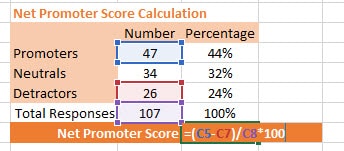
The formulas to calculate NPS in Excel, promoter / passive / detractor counts, segment breakdowns, trend reporting, all in one spreadsheet.
What's inside
- The NPS formula in Excel, promoter / passive / detractor counts and the final score
- Segment views that let you compare scores by customer type, region or product
- A trend sheet for tracking monthly NPS over time with clean visualisation
- Worked sample data so the model is usable the moment you open it
“Genroe’s ability to be hands on with all areas of our business, guide each area of our business through the steps of introducing NPS into our BAU through outstanding communication, was their greatest strength.”
Michael Bray
Grays
Who it's for
- Programme managers running a pilot NPS programme on a spreadsheet before investing in a platform
- Analysts who need a transparent, auditable NPS calculation for the executive team
- CX leaders wanting one Excel model that does promoter / passive / detractor and trend together